
Building Track-A-Bot: How It Came Together
Bots Everywhere, Clarity Nowhere
A few years ago, I wanted a simple way to track search engine crawlers like Googlebot and Bingbot to better understand how they operate. That curiosity led to an "experiment" I called the Google Tracker 4200, an experience I share here.
From that "experiment", I developed Track-A-Bot, a WordPress plugin that tracks, analyzes, and presents bot data in a simple, user-friendly way. There also is Track-A-Bot.com , where you can explore bot details from the data it's collected so far.
In this post, I'll walk through the progress I've made on both the plugin and the website.
1. The Original Problem: Bots Everywhere, Clarity Nowhere
The starting point was simple and very real: websites are constantly hit by bots, but most site owners have no clear, human-readable way to understand who is visiting, why, and whether it matters.
Server logs were noisy.
Analytics tools were vague.
Security plugins were heavy-handed.
I wanted something different:
- Lightweight
- Transparent
- Honest about what it sees
- Useful to humans, not just sysadmins
That core philosophy never really changed.
From my experience with the Googlebot Tracker 4200, I learned how important it is to track and analyze SEO, AI, and other bots-so crawl budget isn't wasted and bots aren't hitting errors or 404s.
Bots have been around for decades, and there are plenty of ways to track and analyze them today. Most solutions, however, are complex or focused on other problems. I wanted something simple.
2. Early Direction: Observe First, Judge Later
From the beginning, Track-A-Bot wasn't meant to block bots-it was meant to observe and explain them.
Key early decisions:
- Track requests without interfering
- Log exactly what bots present (UA strings, IPs, headers)
- Avoid assumptions unless evidence exists
This is why Track-A-Bot leans into raw visibility rather than aggressive classification.
The more data you gather-and the more decisions the code makes-the longer the load time. I wanted something lightweight that wouldn't slow the website down.
There's a lot of security software that blocks IPs and spam bots. I wanted something focused on the bots that actually matter: SEO and AI crawlers.
3. The WordPress Reality Check
Once implementation started, WordPress itself became a major design constraint:
- Hooks fire differently than expected
- Admin tables must stay performant
- Shared hosting realities matter
So Track-A-Bot evolved into:
- A custom database table (not post meta)
- Clean admin pages instead of bloated dashboards
- Purpose-built queries (MySQLi, not PDO)
The plugin had to feel native, not bolted on.
I'll be honest-I hadn't really implemented nonce checks before. That ended up being a bit of a learning curve and added about an extra week of work.
A lot of time went into making sure the plugin runs fast and doesn't slow down a website's load speed. I've been doing SEO for many years, and I'll delete any plugin that hurts performance. I know how critical that is.
4. User-Agent Tokens: Where It Got Interesting
One of the biggest turning points was realizing that user-agent strings are messy-but patterns repeat.
That led to:
- Extracting and normalizing UA tokens
- Tracking first-seen / last-seen timestamps
- Showing frequency instead of guesses
This is also where philosophical questions popped up:
- Should obscure tokens be shown?
- Is hiding noise actually hiding insight?
Track-A-Bot chose transparency, even when the data looked weird.
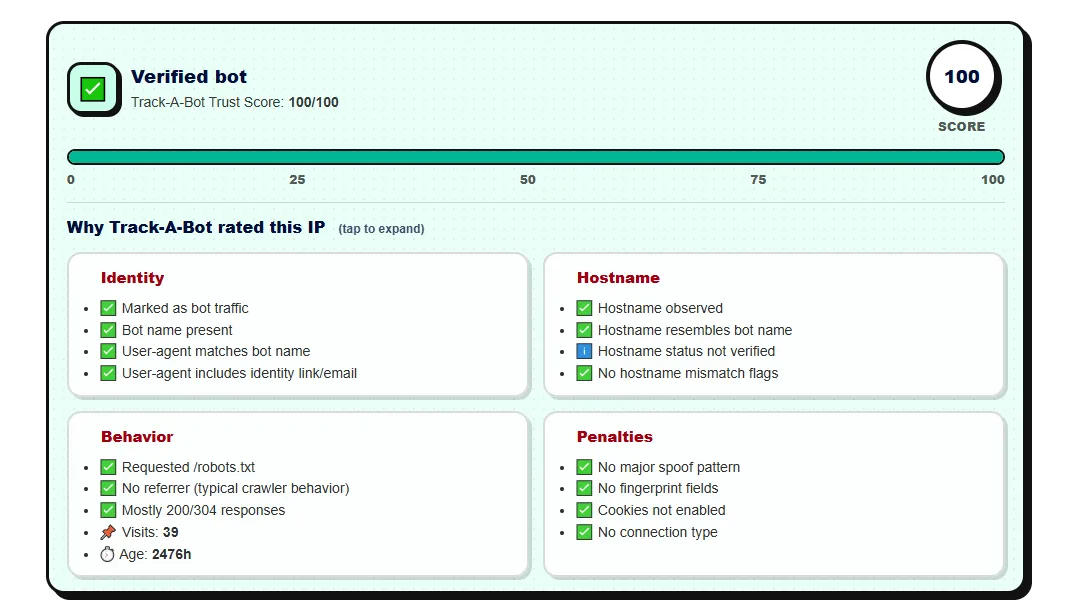
The Track-A-Bot Trust Score (pictured below) will be added to the plugin soon. The formula took months to fine-tune and is based on millions of rows of data.
5. IP Intelligence Without Overreach
The IP pages became a signature feature:
- Reverse lookups
- ASN context
- Crawl behavior over time
But critically:
- No fear-based language
- No "this is malicious" unless provable
- Let users draw conclusions
That restraint is intentional-and rare.
I want to give users as much data as possible without slowing their websites down. I also want to keep things objective and give users the information they need to make their own decisions about each bot.
6. Performance First, Always
Throughout development, there was a consistent rule:
If it slows the site down, it doesn't ship.
That meant:
- Tight indexes
- Pagination defaults
- Sensible caps
- No background cron chaos
Track-A-Bot stays fast because it refuses to be clever at the wrong time.
Making sure both the website and the plugin load fast took the most time. It involved a lot of trial and error.
7. Design Philosophy: Calm, Not Alarmist
Visually and conceptually, Track-A-Bot avoids:
- Red warnings everywhere
- Fake urgency
- Security-plugin theatrics
Instead, it presents:
- Neutral tables
- Plain language
- Context over conclusions
It treats bot traffic as a fact of the web, not an invasion.
8. Track-A-Bot Today
What exists now is:
- A bot observation layer
- A research tool
- A transparency engine
It's useful to:
- Developers
- SEOs
- Site owners who actually care how the web works
Install the plugin, and within a day, you'll likely spot actionable insights you can use to improve your site.
9. The Unwritten Part
Much of Track-A-Bot's value comes from things you can't see:
- Questioning defaults instead of just accepting them
- Taking the time to build features thoughtfully
- Prioritizing accuracy and reliability over flashy bells and whistles
It's the kind of care that really makes a difference.
Over the next few weeks, I'll be sharing more about Track-A-Bot here on my blog. Thanks for reading! :)
Conversation:
No comments yet. Please contribute to the conversation and leave a comment below.
Conversation:
Ever since building my first website in 2002, I've been hooked on web development. I now manage my own network of eCommerce/content websites full-time. I'm also building a cabin inside a old ghost town. This is my personal blog, where I discuss web development, SEO, cabin building, and other personal musings.
